SolEx B2B API Documentation
Integration reference for developers working with the SolEx B2B platform — authentication, products, orders, baskets and more.
About API
SolEx B2B platform API has been designed for developers who want to automate data flow between systems and optimize sales processes. Its functionalities make it possible to:
- Automatically place orders – directly from external systems such as online stores, ERP systems, or custom applications. The end user doesn't need to enter data manually; orders can be sent directly to the B2B platform.
- Use the B2B platform as a product database – enabling real-time access to up-to-date information on availability, pricing, descriptions, and product images. This significantly simplifies product offer management across other sales channels, such as online stores.
- Create custom integrations – the API offers flexibility that allows the development of tailor-made solutions suited to specific business needs. For example, the B2B platform can be integrated with CRM systems, marketing automation tools, or internal analytics solutions.
As a result, full integration of the sales environment becomes possible - without the need to manually transfer data - while ensuring information consistency across the entire ecosystem.
Before you dive in, I encourage you to review the FAQ section. It provides quick answers to common questions and practical guidance that can save time and streamline your integration work.
https://[your-platform-address]Authentication POST
This endpoint is used to authenticate a client and retrieve a temporary token for further API access. Authentication is based on a combination of the client's API key, current timestamp, and client identifier hashed using the MD5 algorithm.
Since the hash is generated based on the current timestamp, it must be regenerated when refreshing the token.
Generated token is valid for 60 minutes.
Request parameters:
| Parameter | Example value | Description | Data Type |
|---|---|---|---|
| Hash | "8fcf8e0609e5107142dd4df279ce04a2" |
A MD5 hash made of concatenated: API key, Timestamp (UTC) and ClientId. | string |
| ClientId | 10 |
The client identifier assigned to your account. | integer |
| Timestamp | "2025-12-04 14:59:18" |
The timestamp (UTC) of the request used in hash generation and request validation. | string |
https://[your-platform-address]/static/ApiExamples/GettingToken.html
Response parameters:
| Parameter | Value | Description | Data Type |
|---|---|---|---|
| AccessToken | string |
Token to use in further API methods | string |
| TokenType | string |
Token type | string |
| ExpiresIn | integer |
Token expiration time in seconds | int |
// Generate necessary data for example in JavaScript: const apiKey = "AAAAAAAA-AAAA-AAAA-AAAA-AAAAAAAAAAAA"; // User's API key const clientId = 10; // Example client number associated with API Key // Can be obtained at https://[your-platform-address]/swagger/ui/index let timestamp = new Date().toISOString().slice(0, 19).replace('T', ' '); // Date for ex. 2025-12-04 14:59:18 const rawString = `${upperApiKey}${timestamp}${clientId}`; // Merge necessary data into one string const hash = CryptoJS.MD5(rawString).toString(); // Generate MD5 hash const requestData = { Hash: hash, ClientId: clientId, Timestamp: timestamp }; console.log(requestData); // We can now use generated data to prepare a cURL requestcurl -X POST "https://[your-platform-address]/api3/token" ^ -H "Content-Type: application/json" ^ -d "@body.json"
{
    "Hash": "8fcf8e0609e5107142dd4df279ce04a2",
    "ClientId": "10",
    "Timestamp": "2025-08-05 08:31:05"
}{
"AccessToken": "12345678-abcd-1234-abcd-1234abcd5678",
"TokenType": "bearer",
"ExpiresIn": 3600
}PRODUCTS
Searching products GET
This method allows you to search and filter products based on a variety of parameters. You can narrow down the results using keywords, specific field filters, product IDs, SKUs, EANs, categories, and more. The response contains a paginated list of products with configurable fields, pricing, availability, attributes, and media data.
Use this method to retrieve a filtered list of products from the catalog. You can specify which fields to return, apply search conditions, define sorting rules, and limit results by product IDs, SKUs, EANs, or categories.
Request parameters avaiable to use in request:field, optionsId, categoryId, where, preset, orderBy, order, productsId, productsSku, productsEan, modificationTimestamp
You can find detailed information about each of them below.
Request parameters:
Response parameters:
curl -X GET "https://[your-platform-address]/api3/product/findProduct?field=Ean%2CName&optionsId=1&productsId=12%2C13" ^
-H "Authorization: Bearer 12345678-abcd-1234-abcd-1234abcd5678"{
"Count": 2,
"PageSize": 2147483647,
"PageNumber": 1,
"HasMore": false,
"CollectionType": "Product",
"Items": [
{
"Id": 12,
"Name": "Example product 1",
"Ean": "1234567890123"
},
{
"Id": 13,
"Name": "Example product 2",
"Ean": "3210987654321"
}
]
}CLIENT ADDRESSES
Get client address GET
You can retrieve a complete list of addresses that are currently assigned to your client account. This functionality allows you to review all stored delivery locations associated with your profile in one place, ensuring that you have full visibility over your saved contact details.
These addresses are not just for reference – they can be seamlessly reused in a variety of subsequent operations within the platform, such as placing a new order or specifying a delivery location without the need to enter the same information repeatedly.
Response parameters:
curl -X GET "https://[your-platform-address]/api3/address/clientAddress" ^
     -H "Authorization: Bearer 12345678-abcd-1234-abcd-1234abcd5678"
{
  "Items": [
    {
      "Id": "452000000000",
      "Country": "Polska",
      "Region": "śląskie",
      "Name": "John Smith",
      "Street": "Maple Street",
      "City": "New York",
      "PostalCode": "10-001",
      "Phone": "600123321",
      "CountryId": 1,
      "RegionId": 1,
      "Email": "john.smith@example.com",
      "ApartmentNumber": "12B",
      "HouseNumber": "120",
      "TaxNumber": null,
      "OneTimeAdress": false
    }
  ]
}
Add new address POST
This method is used to add a new address to the customer's account. This is a shipping addresses required in the ordering process. The response typically returns a unique identifier of the newly created address for future reference.
Structure of object:
| Field | Type | Required/Validated | Description |
|---|---|---|---|
| Name | string |
Yes (regex validation) | Full name of the recipient. |
| Street | string |
Yes (regex validation) | Street name. |
| City | string |
Yes (regex validation) | City name. |
| PostalCode | string |
No (regex validation) | Postal code (e.g., "10-001"). |
| Phone | string |
No (regex validation) | Contact phone number. |
| CountryId | integer |
Yes | Country identifier. |
| RegionId | integer |
No | Region/province identifier. |
string |
No (regex validation) | Contact email address. | |
| HouseNumber | string |
No (regex validation) | House number. |
| ApartmentNumber | string |
No (regex validation) | Apartment number. |
| TaxNumber | string |
No (regex validation) | Tax Identification Number (NIP/VAT ID). |
| OneTimeAdress | boolean |
No | Set to true for one-time addresses. Default false.Temporary address deleted after ERP synchronization. |
curl -X POST "https://[your-platform-address]/api3/address/clientAddress" ^
     -H "Authorization: Bearer 12345678-abcd-1234-abcd-1234abcd5678" ^
     -H "Content-Type: application/json" ^
-d "@body.json"{
"CountryId": 1,
"Name": "John Smith Home Address",
"Street": "Maple Street",
"City": "New York",
"HouseNumber": "120",
"ApartmentNumber": "1A",
"PostalCode": "10-001",
"RegionId": 12,
"Email": "john.smith@example.com",
"Phone": "600123321",
"TaxNumber": "0000000000",
"OneTimeAddress": true
}"-1" // Id of new addressWAYBILLS
Add new waybill POST
This endpoint allows you to create a new waybill for a given order ID. You can attach a PDF file which contains a waybill. Once the request is processed successfully, the system returns the identifier of the newly added attachment.
You have to add an attachment containing shipping label in PDF format. The file must be uploaded together
with the request in multipart/form-data.
Returns ID of new attachment or message: There is already a waybill for the order witch that ID.
curl -X POST "https://[your-platform-address]/api3/order/waybill/-12345" ^
     -H "Authorization: Bearer 12345678-abcd-1234-abcd-1234abcd5678" ^
-F "file=@waybill.pdf"-123 // Id of new attachment
// OR message if there is already a waybill for the order witch that ID
{
"Message": "Istnieje już list przewozowy dla zamówienia o ID: -12345"
}
Get waybill for order GET
Response parameters:
| Field | Type | Description | Data type |
|---|---|---|---|
| RelativePath | integer |
Relative path to waybill file | int |
| Size | integer |
File size | int |
| Url | string |
Url to waybill | string |
| UploadDate | string |
Receiver name | string |
curl -X GET "https://[your-platform-address]/api3/order/waybill/-12345" ^
     -H "Accept: application/json" ^
-H "Authorization: Bearer 12345678-abcd-1234-abcd-1234abcd5678"{
"RelativePath": "/Zasoby/OrderWaybill/-12345/d92057ea-16f0-4bb9-9f82-fc9339162663.pdf",
"Size": 8175,
"Url": null,
"UploadDate": "2025-09-03T12:48:12.78"
}ORDERS
Add new order POST
This request is used to place a new order in the system via the API. It requires providing key details such as the selected payment and delivery methods, an optional comment, and a list of products with their identifiers and quantities. The request must also include the delivery address ID that is already stored in the system. Additionally, the request allows passing extra parameters in the AdditionalProperties array, which can be used to extend the order definition with custom attributes (e.g., promo codes or special handling instructions).
"!! TESTING order via SolEx API !!" or similar so order would not be processed by the staff
during tests!
Request parameters:
Response parameters:
| Parameter | Type | Description | Data Type |
|---|---|---|---|
| OrderId | int |
Unique identifier of the created order. Negative values may indicate a test or temporary order. | integer |
| BasketStatements[].Message | string |
General message related to the basket (e.g., warnings, validations, additional information). | string |
| BasketStatements[].Type | string |
Type of the basket message. | string |
| BasketProductsStatements[].Message | string |
Message related to specific products in the basket (e.g., stock warnings, availability notes). | string |
| BasketProductsStatements[].Type | string |
Type of the product-related message. | string |
curl -X POST "https://[your-platform-address]/api3/order" ^
     -H "Content-Type: application/json" ^
     -H "Authorization: Bearer 12345678-abcd-1234-abcd-1234abcd5678" ^
-d "@body.json"{
"PaymentName": "string",
"DeliveryName": "string",
"Comment": "!! TESTING order via SolEx API !!",
"OrderLines": {
"KeyType": "Ean",
"Lines":
[
{ "Key": "996633", "Quantity": 7 },
{ "Key": "4779039731181", "Quantity": 2 }
]
},
"AddressId": 2400000000,
"AdditionalProperties": []
}{
"OrderId": -12345,
"BasketStatements": [
{
"Message": " Example warning message for basket",
"Type": "warning"
}
],
"BasketProductsStatements": [
{
"Message": " Example warning message for products",
"Type": "warning"
}
]
}Get delivery options GET
This method is used to retrieve a complete list of all delivery methods available in the system. It provides general information about each delivery option, such as its identifier and name, without applying any restrictions at this stage. It returns an array of all delivery options available.
This method is intended primarily for displaying or storing the full catalog of delivery methods, which can later be cross-checked during order placement to ensure the chosen option is valid for the given transaction.
Response parameters:
| Parameter | Value | Description | Data Type |
|---|---|---|---|
| Id | integer |
Identifier of the delivery option | int |
| Name | string |
Delivery option name | string |
curl -X GET "https://[your-platform-address]/api3/order/delivery" ^
-H "Authorization: Bearer 12345678-abcd-1234-abcd-1234abcd5678"{
"Items": [
{
"Id": 1,
"Name": "Delivery option 1"
},
{
"Id": 2,
"Name": "Delivery option 2"
}
]
}Get payment options GET
This method is used to retrieve a list of all available payment methods. These options can be presented to the customer during the checkout process, allowing them to select their preferred method of payment.
The response typically includes details such as the payment identifier and name.
Response parameters:
| Parameter | Value | Description | Data Type |
|---|---|---|---|
| Id | integer |
Identifier of the delivery option | int |
| Name | string |
Payment option name | string |
curl -X GET "https://[your-platform-address]/api3/order/payment" ^
     -H "Authorization: Bearer 12345678-abcd-1234-abcd-1234abcd5678"
{
  "Items": [
    {
      "Id": 1,
      "Name": "Payment option 1"
    },
    {
      "Id": 2,
      "Name": "Payment option 2"
    }
  ]
}
BASKETS
Creating new basket POST
This method is used to create a new shopping basket. It initializes an empty basket that can later be filled with products, assigned to a customer, and processed through the checkout flow. The response typically includes a unique basket identifier, which should be used in subsequent operations related to that basket such as adding products or finalizing a basket.
Request parameters:
| Parameter | Value | Description | Required | Data Type |
|---|---|---|---|---|
| BasketName | string |
Name of newly created basket | Yes | string |
| ShowOnFront | boolean |
Indicates if the basket should be displayed on the frontend | No | bool |
| SetActual | boolean |
Indicates if the basket should be choosen as a main basket in frontend | No | bool |
Response parameters:
| Parameter | Value | Description | Data Type |
|---|---|---|---|
| BasketId | integer |
Identifier of new basket | int |
curl -X POST "https://[your-platform-address]/api3/basket" ^
     -H "Content-Type: application/json" ^
     -H "Authorization: Bearer 12345678-abcd-1234-abcd-1234abcd5678" ^
-d "@body.json"{
"BasketName": "New basket name",
"ShowOnFront": true,
"SetActual": true
}{
"BasketId": "54321"
}Delete basket DELETE
This method is used to remove the current shopping basket. Once executed, all items previously added to the basket will be cleared, and the basket will no longer be available for further operations. This method is typically used when a customer cancels their order or decides to start a new shopping process.
Request parameters:
| Parameter | Value | Description | Required | Data Type |
|---|---|---|---|---|
| Id | integer |
Identifier of the basket to remove | Yes | int |
curl -X DELETE "https://[your-platform-address]/api3/basket/12345" ^
     -H "Content-Type: application/json" ^
-H "Authorization: Bearer 12345678-abcd-1234-abcd-1234abcd5678""Basket '12345' deleted."Get baskets list GET
This method is used to retrieve a list of all shopping baskets associated with the customer or account. The response typically includes details such as basket identifiers, creation dates, current status, and summary information about the contents. This allows the customer or system to manage multiple baskets, review their state, or continue a previously started shopping process.
Response parameters:
| Parameter | Value | Description | Data Type |
|---|---|---|---|
| BasketId | string |
Unique identifier of the basket | string |
| BasketName | string |
Product SKU (stock keeping unit) | string |
| ShowOnFront | boolean |
Indicates if the basket should be displayed on the frontend | bool |
| IsActual | boolean |
Indicates whether the item is marked as the current (active) one | bool |
curl -X GET "https://[your-platform-address]/api3/basket/list" ^
     -H "Content-Type: application/json" ^
     -H "Authorization: Bearer 12345678-abcd-1234-abcd-1234abcd5678"
            [
  {
    "BasketId": "12345",
    "BasketName": "Example basket",
    "ShowOnFront": true,
    "IsActual": true
  }
]
Get basket GET
Retrieves detailed information about a specific basket, including its items, quantities, and related metadata.
Path parameters:
| Parameter | Value | Description | Required | Data Type |
|---|---|---|---|---|
| id | string |
Id of basket, which data is requested | Yes | string |
Response parameters:
curl -X GET "https://[your-platform-address]/api3/basket/12345" ^
     -H "Content-Type: application/json" ^
     -H "Authorization: Bearer 12345678-abcd-1234-abcd-1234abcd5678"
            {
  "BasketId": "12345",
  "Items": [
    {
      "Id": 98765,
      "Sku": "ProductSymbol",
      "Ean": "1234567890123",
      "Quantity": 1.00,
      "NetPrice": 4.9410,
      "Description": null,
      "AddDate": "2025-08-19T12:13:36.167",
      "Type": 1,
      "ProductId": 123456
    }
  ],
  "Comment": null,
  "DeliveryId": null,
  "Delivery": null,
  "DeliveryCost": null,
  "PaymentId": null,
  "Payment": null,
  "DeliveryAddressId": null,
  "DeliveryAddress": null,
  "TotalNetValue": {
    "Value": 14.823000,
    "Currency": "PLN"
  },
  "TotalNetValueProducts": {
    "Value": 14.823000,
    "Currency": "PLN"
  },
  "AdditionalProperties": {
    "AdditionalField1": null,
    "AdditionalField2": null
  },
  "ShowOnFront": true
}
Change basket fields PATCH
Updates an existing basket with new data such as payment & delivery methods or customer-related information etc.
Parameters description:
| Parameter | Value | Description | Required | Data Type |
|---|---|---|---|---|
| PaymentId | integer |
Identifier of the new payment method | No | int|null |
| DeliveryId | integer |
Identifier of the new delivery method | No | int|null |
| Comment | string |
Additional comment added to the order | No | string|null |
| AddressId | integer |
Identifier of the delivery address | No | int|null |
| ShowOnFront | boolean |
Indicates if the basket should be displayed on the frontend | No | bool |
| AdditionalProperties | Array |
Custom additional fields defined in the system | No | Array<object> |
| AdditionalProperties[].Key | string |
Name of additional field | Yes (if AdditionalProperties defined) | string |
| AdditionalProperties[].Values[] | Array |
List of values for additional field | Yes (if AdditionalProperties defined) | Array<string> |
curl -X PATCH "https://[your-platform-address]/api3/basket/12345" ^
     -H "Content-Type: application/json" ^
     -H "Authorization: Bearer 12345678-abcd-1234-abcd-1234abcd5678" ^
-d "@body.json"{
"PaymentId": 1,
"DeliveryId": 1,
"Comment": "!! TESTING order via SolEx API !!",
"AddressId": 123,
"ShowOnFront": true,
"AdditionalProperties": [
{
"Key": "AdditionalField1",
"Values": [
"ExampleValue"
]
}
]
}Add products to basket POST
This method is used to add one or more products to an existing shopping basket. The request includes the basket identifier along with product details such as product ID, quantity, and optional attributes (e.g., variants or customizations). The response confirms that the products have been added and usually returns updated basket information, including totals and item details.
Request parameters:
| Parameter | Value | Description | Required | Data Type |
|---|---|---|---|---|
| ProductKey | Object |
Container for product identification details | Yes | <object> |
| ProductKey.KeyType | "Ean" |
Type of product key (e.g., Ean, SKU) |
Yes | string |
| ProductKey.Key | "4779039731181" |
Actual product identifier (e.g., Ean number) | Yes | long |
| Quantity | "1" |
Quantity of the product to be added | Yes | string |
| UnitId | "-3" |
Identifier of the unit in which the product is measured (e.g., -3 for pieces) | Yes | string |
| Config | Object |
Configuration options for validation and error handling. | No | object |
| Config.ErrorOnProductQuantityChange | boolean |
If set to true, an error is returned when the product quantity is adjusted automatically.
|
No | bool |
| Config.ErrorOnProductWarning | boolean |
If set to true, an error is returned when the product has warnings (e.g., limited
availability). |
No | bool |
curl -X POST "https://[your-platform-address]/api3/basket/51972/item" ^
     -H "Content-Type: application/json" ^
     -H "Authorization: Bearer 12345678-abcd-1234-abcd-1234abcd5678" ^
-d "@body.json"{
"ProductKey":
{
"KeyType": "Ean",
"Key": "4779039731181"
},
"Quantity": "1",
"UnitId": "-3",
"Config":
{
"ErrorOnProductQuantityChange": true,
"ErrorOnProductWarning": true
}
}"Basket item added."Remove product from the basket DELETE
This method is used to remove a specific product from an existing shopping basket. The request requires the basket identifier and the product identifier that should be removed (e.g. Ean, SKU).
Request parameters:
| Parameter | Value | Description | Required | Data Type |
|---|---|---|---|---|
| Key | "4779039731181" |
Actual product identifier (e.g., Ean number) | Yes | long |
| KeyType | "Ean" |
Type of product key (e.g., Ean, SKU) |
Yes | string |
curl -X DELETE "https://[your-platform-address]/api3/basket/12345/item" ^
       -H "Content-Type: application/json" ^
       -H "Authorization: Bearer 12345678-abcd-1234-abcd-1234abcd5678"
-d "@body.json"{
"Key": "4779039731181",
"KeyType": "Ean"
}"Basket item deleted."Finalize basket POST
The FinalizeBasket method is used to complete the shopping process for a given basket. Once executed, the basket is confirmed and converted into an order. The request may include additional details such as selected payment method, shipping option, or customer notes. The response typically returns the created order identifier and confirmation data required for further processing.
Response parameters:
| Parameter | Value | Description | Data Type |
|---|---|---|---|
| OrderId | integer |
Identifier of the new order | int |
| OrderNumber | string |
Order number | string |
| ResultMessage | string |
Identifier of the new payment method | string |
curl -X POST "https://[your-platform-address]/api3/basket/12345/finalize" ^
     -H "Accept: application/json" ^
     -H "Authorization: Bearer 12345678-abcd-1234-abcd-1234abcd5678" ^
-d {}{
"OrderId": -1583,
"OrderNumber": "1/10/25",
"ResultMessage": "Your order was sent"
}COUNTRIES AND REGIONS
Get countries GET
This method is used to retrieve a list of available countries supported by the system. The response typically includes country unique identifiers, names and their ISO codes. This information can be used when creating addresses, configuring shipping options, or validating customer data.
Response parameters:
| Parameter | Value | Description | Data Type |
|---|---|---|---|
| Id | integer |
Identifier of the country (to use in addresses) | int |
| Name | string |
Country name | string |
| Symbol | string |
Country code in the ISO 3166-1 alpha-2 format | string |
curl -X GET "https://[your-platform-address]/api3/country" ^
-H "Authorization: Bearer 12345678-abcd-1234-abcd-1234abcd5678"{
"Items": [
{
"Id": 1,
"Name": "Polska",
"Symbol": "PL"
},
{
"Id": 2,
"Name": "Czechy",
"Symbol": "CZ"
},
{
"Id": 3,
"Name": "Słowacja",
"Symbol": "SK"
}
]
}Get regions GET
This method is used to retrieve a list of regions (such as states, provinces, or administrative areas) available to choose during creating an address or placing an order. The response typically includes region identifiers, names, and related country identifiers. This method is often used to support address creation.
Response parameters:
| Parameter | Value | Description | Data Type |
|---|---|---|---|
| Id | integer |
Identifier of the region (to use in addresses) | int |
| Name | string |
Country name | string |
| CountryId | integer |
Identifier of the country, see the Get countries method | int |
curl -X GET "https://[your-platform-address]/api3/region" ^
-H "Authorization: Bearer 12345678-abcd-1234-abcd-1234abcd5678"{
"Items": [
{
"Id": 1,
"Name": "dolnośląskie",
"CountryId": 1
},
{
"Id": 2,
"Name": "kujawsko-pomorskie",
"CountryId": 1
}
]
}Feed XMLs
Get data feed file list
Returns a structured list of all currently available integration files that can be downloaded by the client. This endpoint allows external systems to programmatically discover which integration files (by data type, format, and version) are exposed for download. Only the latest version of each file is returned.
The response is a JSON array, where each object represents one available integration file variant (e.g., same file in different encodings or formats).
Response parameters:
| Parameter | Value | Description | Data Type |
|---|---|---|---|
| IntegrationDataType | integer |
Type of integration data (e.g., 0 = Products, 1 = Shops). | int |
| IntegrationDataFormat | integer |
File format or encoding identifier. 0 for XML, 1 for CSV. | int |
| Version | integer |
Version number of the file. Only the highest version per data type is relevant for consumption. | int |
| Url | string |
Absolute download URL for the file. | string |
curl -X GET "https://[your-platform-address]/api3/DataFeed/List" ^
-H "Authorization: Bearer 12345678-abcd-1234-abcd-1234abcd5678"[
{
"IntegrationDataType": 0,
"IntegrationDataFormat": 0,
"Version": 3,
"Url": "https://[your-platform-address]/xmlapi/1/3/UTF8/AAAAAAAA-AAAA-AAAA-AAAA-AAAAAAAAAAAA"
},
{
"IntegrationDataType": 0,
"IntegrationDataFormat": 0,
"Version": 3,
"Url": "https://[your-platform-address]/xmlapi/1/3/Windows1250/AAAAAAAA-AAAA-AAAA-AAAA-AAAAAAAAAAAA"
},
{
"IntegrationDataType": 0,
"IntegrationDataFormat": 1,
"Version": 2,
"Url": "https://[your-platform-address]/xmlapi/2/2/UTF8/AAAAAAAA-AAAA-AAAA-AAAA-AAAAAAAAAAAA"
}
]Documents (Orders/Invoices)
Get order or invoice by key
Returns a single document identified by the provided key. The response contains detailed metadata such as the document's identifier, name, creation date, type, status, net value, and payment information. When applicable, the response also includes related documents, associated waybills, an indicator showing whether a PDF version is available, and whether the client has downloaded the document.
The data is returned in JSON format.
Request parameters:
| Parameter | Value | Description | Required | Data Type |
|---|---|---|---|---|
| key | string |
The identifier or name of the order or invoice | Yes | string |
Response parameters:
| Parameter | Value | Description | Data Type |
|---|---|---|---|
| Id | string |
Document identifier | string |
| Status | string |
Document status | string |
| Name | string |
Document full name | string |
| ForeignName | string |
Connected documents foreign name | string |
| NameFromClient | string |
Clients own name of the document for example internal identifier | string |
| CreatedAt | string |
Document creation date | string |
| HasPdf | bool |
Boolean value that indicates if document has an PDF available | boolean |
| NetValue.Value | number |
Documents value | number |
| NetValue.Currency | string |
Documents currency | string |
| Type | string |
Document type for example order | string |
| Paid | bool |
Indicates if document is paid | boolean |
| Waybills.Key | string |
Waybill number | string |
| Waybills.Value | string |
Parcel tracking URL connected with the waybill | string |
| DownloadedByClient | bool |
True if document was downloaded by the client | boolean |
| RelatedDocs.Id | string |
Id of related document | string |
| RelatedDocs.Name | string |
Full name of related document | string |
| B2BId | integer |
Order id in B2B system | int |
curl -X GET "https://[your-platform-address]/api3/document?key=12345" ^
-H "Authorization: Bearer 12345678-abcd-1234-abcd-1234abcd5678"{
"Id": "12345",
"Status": "2. Gotowa do druku",
"Name": "ZK 123/MAG/2025",
"ForeignName": "B2B 1/1/25",
"NameFromClient": null,
"CreatedAt": "2025-10-10T00:00:00",
"HasPdf": false,
"NetValue": {
"Value": 2000,
"Currency": "PLN"
},
"Type": "Order",
"Paid": true,
"Waybills": [
{
"Key": "123456789123456789",
"Value": "https://www.ups.com/track?loc=en_US&requester=123456789123456789"
}
],
"DownloadedByClient": false,
"RelatedDocs": [
{
"Id": "126022167248014589",
"Name": "ZK 123/MAG/2025"
},
{
"Id": "642434126496757340",
"Name": "FS 321/MAG/2025"
},
{
"Id": "933361229140106532",
"Name": "WZ 73/MAG/2025"
}
],
"B2BId": -1234
}Get document file by id
Returns the document file in the requested format. The response is delivered as a binary stream and may be exported to PDF or any supported format with the specified encoding. The document is selected by its identifier, and the output format must be explicitly provided.
Request parameters:
| Parameter | Value | Description | Required | Data Type |
|---|---|---|---|---|
| id | long |
Document id | Yes | long |
| format | string |
'pdf' or one of defined export format {name-encoding} e.g. 'Solex CSV po symbolu-UTF8'. Available encoding: UTF8; Windows1250. | Yes | string |
Response parameters:
| Parameter | Value | Description | Data Type |
|---|---|---|---|
| file | byte |
Downloadable document (blob) | byte |
curl -X GET "https://[your-platform-address]/api3/document/download?id=12345&format=pdf" ^
-H "Authorization: Bearer 12345678-abcd-1234-abcd-1234abcd5678" ^
-H "Accept: application/octet-stream" ^
-O Document.pdf % Total % Received % Xferd Average Speed Time Time Time Current
Dload Upload Total Spent Left Speed
100 49893 100 49893 0 0 333k 0 --:--:-- --:--:-- --:--:-- 338kGet document file by date range
Returns a collection of documents that were added within the specified date range. Each element in the collection contains detailed information about the document, including its identifier, name, creation date, status, type, and payment indicator. When available, the response also provides related documents, associated waybills, and information on whether the document has been downloaded or includes a PDF version.
The data is returned in JSON format, with all documents placed in the Items array.
Request parameters:
| Parameter | Value | Description | Required | Data Type |
|---|---|---|---|---|
| startDate | date-time |
Starting date the document was added | Yes | date-time |
| endDate | date-time |
Ending date the document was added | Yes | date-time |
Response parameters:
The response parameters are identical to those returned by the Get order or invoice by key method, but are provided within the Items array.
curl -X GET "https://[your-platform-address]/api3/document/fromRange?startDate=2025-10-15T12%3A12%3A54.943Z&endDate=2025-11-03T12%3A12%3A54.943Z" ^
-H "Authorization: Bearer 12345678-abcd-1234-abcd-1234abcd5678"{
"Items": [
{
  "Id": "12345",
  "Status": "2. Gotowa do druku",
  "Name": "ZK 123/MAG/2025",
  "ForeignName": "B2B 1/1/25",
  "NameFromClient": null,
  "CreatedAt": "2025-10-10T00:00:00",
  "HasPdf": false,
  "NetValue": {
    "Value": 2000,
    "Currency": "PLN"
  },
  "Type": "Order",
  "Paid": true,
  "Waybills": [
    {
      "Key": "123456789123456789",
      "Value": "https://www.ups.com/track?loc=en_US&requester=123456789123456789"
    }
  ],
  "DownloadedByClient": false,
  "RelatedDocs": [
    {
      "Id": "126022167248014589",
      "Name": "ZK 123/MAG/2025"
    },
    {
      "Id": "642434126496757340",
      "Name": "FS 321/MAG/2025"
    },
    {
      "Id": "933361229140106532",
      "Name": "WZ 73/MAG/2025"
    }
  ],
  "B2BId": -1234
}
]
}Frequently Asked Questions (FAQ)
Common questions, troubleshooting tips, and practical guidance for working with the API.
1. Where can I find the ClientId?
To obtain the Client ID, log in to the account of the client you wish to check, then navigate to the technical documentation page (Swagger):
Information regarding the Client ID and API Key should be located on that page.
If the API key is missing or needs to be updated, you can generate a new one using the Generate new ApiKey button.
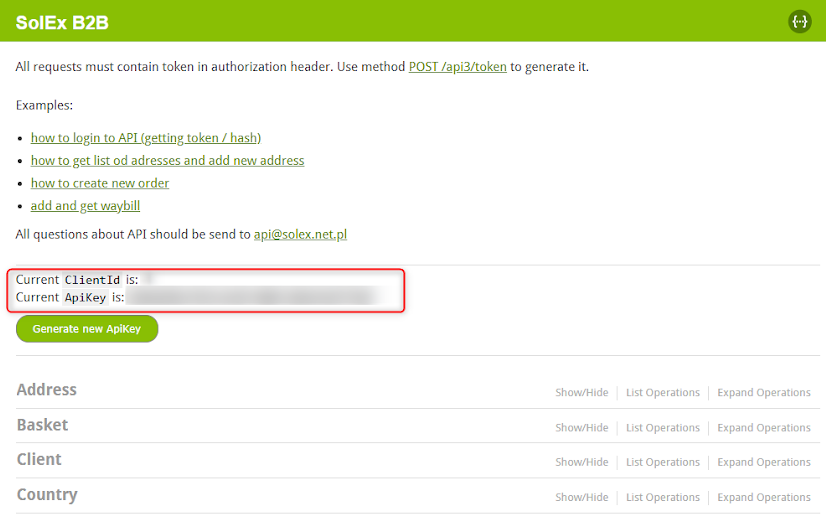
https://[platform-address]/swagger/ui/index
2. What does the "Cannot finalize order" error mean in the POST /api3/order method?
This error indicates that certain conditions blocking the checkout process have not been met. For example, this can occur when attempting to add a product to the cart that is currently out of stock.
To troubleshoot the cause, the most effective method is to reproduce the order manually in the system and verify if finalization is possible using the exact same parameters.
When reproducing the order manually, pay close attention to:
- Stock levels for all line items.
- Customer segment restrictions (e.g., if the user is authorized to buy these specific items).
- Shipping/Payment method compatibility with the delivery address.
{
  "Items": [
    {
      "ContextId": "-",
      "ContextIdName": "Order",
      "ErrorCode": "ImpossibleOperation",
      "Error": "Cannot finalize order: "
    }
  ]
}
3. How to check the stock level or available units of a product?
To retrieve the stock levels for any products, you can use the product search API method.
This method allows you to search for products based on selected criteria, including stock levels (Qty). The method is versatile enough to support advanced filtering as well.
To check the UnitId needed for placing an order, look for units of sale available for the specific product.
You can find an example request here.
Important Note on Platform Configuration
The platform configuration might prevent effective stock level tracking via the API. If the setting maximum_displayed_stock (maksymalny_pokazywany_stan) is set to 1, the Qty value will only return a range between 0 and 1.
To fix this, modify this setting in the platform configuration and enter a very large number to expand the range of displayed stock levels, or ask the platform owner to update it.
/api3/product/findProduct
4. My token expired or API returns 401 Unauthorized. What should I do?
The authentication token is valid for 60 minutes. After it expires, all API calls will return a 401 Unauthorized response.
To handle this properly:
- Generate a new hash using your API key, a fresh UTC timestamp, and your ClientId.
- Call POST /api3/token with the new hash to obtain a fresh token.
- Replace the expired token in the
Authorizationheader of all subsequent requests.
{
  "Message": "Authorization has been denied for this request."
}
5. What is the correct workflow to place an order via API?
Placing an order through the API requires several steps that must be executed in the correct sequence. Below is the recommended workflow:
- Authenticate — call POST /api3/token to get your access token.
- Get delivery address — use GET /api3/address to retrieve available delivery addresses or add a new one.
- Check delivery & payment options — call GET delivery options and GET payment options to find valid method IDs.
- Place the order — call POST /api3/order with the products, address ID, and selected delivery/payment methods.
"!! TESTING order via SolEx API !!") during development to prevent staff from processing test orders!
1. POST /api3/token
   → get AccessToken

2. GET  /api3/address
   → get AddressId

3. GET  /api3/order/deliveryMethods
   → get DeliveryMethodId

4. GET  /api3/order/paymentMethods
   → get PaymentMethodId

5. POST /api3/order
   → place the order
6. What is the difference between /api3/order and the basket workflow?
The API offers two separate ways to create orders:
Direct order (POST /api3/order)
A single API call that places an order immediately. Best for simple integrations where all required data (products, address, payment/delivery method) is already known.
Basket workflow
A multi-step process that mirrors a traditional shopping cart experience. It is more flexible and allows building the order incrementally:
- Create a basket
- Add products (can be done in multiple calls)
- Set delivery/payment options
- Finalize the basket to convert it into an order
Direct order:
  1 API call → order placed
  Best for: automation, ERP sync

Basket workflow:
  Multiple API calls → flexible cart
  Best for: custom storefronts,
  interactive UIs